Using QR Codes for Offline Promotion
Overview
QR codes provide a powerful bridge between physical spaces and digital subscriptions. This lesson covers how to create effective QR code campaigns for live events, merchandise, print advertising, and other offline promotion opportunities. You'll learn best practices for QR code placement, design integration, and tracking campaign performance.
What You'll Need
- Your generated OnPitch QR code (from profile page on the OnPitch dashboard)
- Access to design software or printing services
- Understanding of your offline promotion opportunities
- Plan for where and how you'll use QR codes
Step-by-Step Instructions
1. Download Your High-Resolution QR Code
Access your professional-quality QR code from your OnPitch profile dashboard.
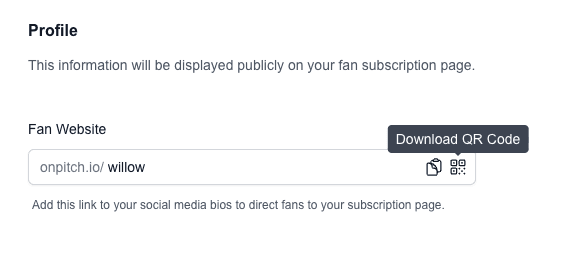
Download process:
- Navigate to your OnPitch profile dashboard
- Locate the QR code icon next to your profile URL
- Click to generate and display your QR code
- Click "Download QR Code" to save the high-resolution PNG file
- The file saves as
yourusername-qr-code.png(3000x3000 pixels)
What you should see: A crisp, high-resolution QR code file ready for use in any design application.
Why high resolution matters: The 3000x3000 pixel resolution ensures your QR code remains sharp and scannable when printed at any size, from business cards to large posters.
2. Plan Your QR Code Campaign Strategy
Identify the most effective locations and contexts for QR code placement based on your audience and activities.
High-impact QR code opportunities:
Live events and performances:
- Stage backdrops and screens during performances
- Merchandise tables and vendor booths
- Entrance areas and lobby displays
- Printed programs or setlists
Print advertising:
- Posters and flyers for events
- Magazine or newspaper advertisements
- Billboard and outdoor advertising
- Direct mail campaigns
Physical locations:
- Storefront windows or displays
- Office or studio locations
- Partner business locations
- Community bulletin boards
3. Design Effective QR Code Materials
Create visually appealing designs that incorporate your QR code while maintaining scannability.
Design best practices:
QR code sizing:
- Minimum size: 1 inch x 1 inch for close-up scanning
- Recommended size: 2-3 inches for comfortable scanning
- Large format: Scale proportionally for posters and banners
Placement and contrast:
- Ensure high contrast between QR code and background
- Avoid placing over busy patterns or images
- Leave white space around the QR code (quiet zone)
- Test scannability before final printing
Call-to-action integration:
- Include clear instructions: "Scan for exclusive updates"
- Add your OnPitch URL as backup: "or visit onpitch.io/yourusername"
- Use compelling messaging: "Get show alerts sent directly to your phone"
4. Create Event-Specific QR Code Campaigns
Develop targeted QR code materials for specific events or promotions to maximize relevance and conversion.
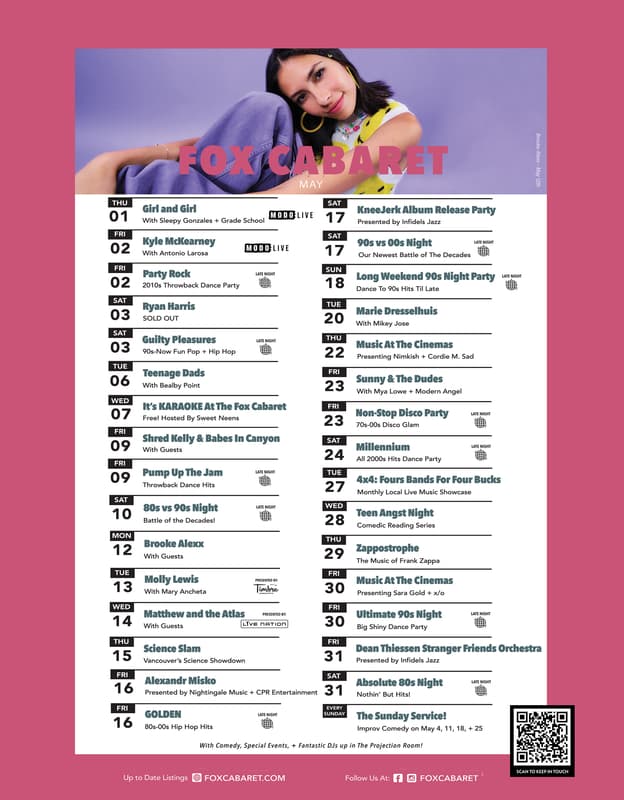
Event campaign examples:
Concert or show promotion:
- "Scan to get notified about future shows in your area"
- Include QR code on event posters and social media graphics
- Add to merchandise sold at the event
Album or product launch:
- "Scan for exclusive behind-the-scenes content"
- Include QR code on album packaging or promotional materials
- Use in pre-launch marketing campaigns
Festival or multi-day events:
- "Scan for daily schedule updates and exclusive content"
- Create day-specific QR code materials
- Include in festival programs and signage
Expected result: Higher conversion rates due to timely, relevant messaging that connects to immediate audience interests.
5. Execute Print Advertising QR Campaigns
Use QR codes in traditional print advertising to bridge offline and digital marketing efforts.
Print advertising applications:
Local publications:
- Include QR codes in local music magazine ads
- Add to community newspaper event listings
- Use in venue program advertisements
Outdoor advertising:
- Include on billboard and transit advertising
- Add to poster campaigns in high-traffic areas
- Use in guerrilla marketing materials
Direct mail campaigns:
- Include QR codes on postcards and flyers
- Add to event invitations and announcements
- Use in targeted neighborhood campaigns
Expected result: Measurable digital engagement from traditional advertising spend, with clear tracking of offline-to-online conversion.
6. Track QR Code Campaign Performance
Monitor the effectiveness of your QR code campaigns using OnPitch analytics and tracking methods.
Performance tracking methods:
OnPitch analytics:
- Monitor subscriber growth during campaign periods
- Track geographic data to identify successful locations
Campaign-specific tracking:
- Note subscriber spikes during specific events
- Compare performance across different QR code placements
- Track which campaigns generate the most engaged subscribers
A/B testing opportunities:
- Test different QR code sizes and placements
- Compare various call-to-action messages
- Experiment with different design approaches
QR Code Campaign Best Practices
Optimize for Scannability
Technical requirements:
- Maintain high contrast (black on white works best)
- Ensure adequate size for scanning distance
- Test scannability before mass production
- Avoid distortion or stretching of the QR code
Environmental considerations:
- Consider lighting conditions where QR codes will be displayed
- Account for viewing angles and accessibility
- Ensure QR codes are at comfortable scanning height
- Protect from weather damage for outdoor use
Provide Clear Instructions
User guidance:
- Include "Scan with your phone camera" instructions
- Provide backup URL for manual entry
- Explain what happens after scanning
- Use familiar language and clear calls-to-action
Value communication:
- Clearly state what subscribers will receive
- Highlight exclusivity and immediate benefits
- Connect to current context or event
- Make the value proposition obvious and compelling
Integrate with Overall Marketing
Brand consistency:
- Match QR code materials to your overall brand aesthetic
- Use consistent messaging across all campaign materials
- Coordinate with other marketing efforts and timing
- Maintain professional appearance and quality
Cross-channel promotion:
- Mention QR code campaigns in social media posts
- Include in email communications to existing subscribers
- Coordinate with live event announcements
- Create anticipation and awareness before deployment
Troubleshooting Common Issues
Low Scan Rates
Problem: QR codes aren't being scanned frequently.
Solutions:
- Increase QR code size for easier scanning
- Improve call-to-action messaging and value proposition
- Ensure better placement in high-traffic, well-lit areas
- Test different design approaches and messaging
Technical Scanning Problems
Problem: QR codes aren't scanning properly.
Solutions:
- Check for adequate contrast and print quality
- Ensure QR code isn't distorted or damaged
- Verify the code links to the correct OnPitch profile
- Test with multiple devices and camera apps
Next Steps
With QR code campaigns driving offline-to-online conversions, you'll want to explore social media integration strategies to maximize your cross-platform audience building efforts. Social media integration helps you leverage existing followers across platforms to grow your OnPitch subscriber base.